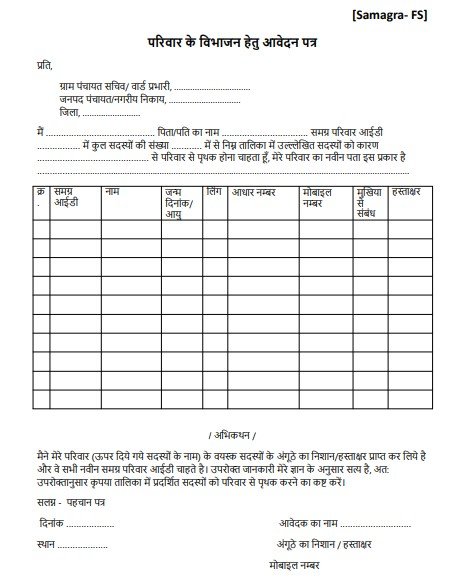
The Parivar Vibhajan Form (Family Division Form) is an important government document. It is used when a joint family splits up and members want to create separate official records. This is common for updating Family IDs (like the Samagra ID), ration cards, and local records.
What Is the Parivar Vibhajan Form?
This form is an official request to separate specific members from an existing family list. In simple terms, it is used when one family becomes two or more families in government records.
By filling out this form, you ask the local authorities to:
- Remove specific names from the old joint family list.
- Create a new Family ID for the separated members.
- Update addresses and relationships.
- Ensure the new family gets their own government benefits.
Why Is This Form Important?
Families often divide due to marriage, jobs, or personal reasons. If you do not update your official records, you might face problems such as:
- Rejection of ration card benefits.
- Issues with pensions or scholarships.
- Errors in income certificates.
- Difficulty getting housing benefits.
Submitting this form ensures that your new family unit is legally recognized and that you receive the welfare benefits you are entitled to.
Who Can Apply?
The following people can file this application:
- The head of the family.
- Any adult family member (with permission).
- A married son or daughter who wants to live separately.
- A widow or divorced individual.
- A member moving to a new address.
Note: All adult members who are moving to the new family list must agree to the separation.
Common Reasons for Family Division
When applying, you must state a clear and honest reason for separating. Common reasons include:
- Marriage and starting a new home.
- Moving to a new city for a job.
- Family disputes or mutual agreements to live apart.
- Financial independence.
- The death of the head of the family.
Where to Submit the Form
You need to submit this form to your local administration:
- In Villages: The Gram Panchayat Secretary.
- In Cities: The Ward In-charge or Municipal Council.
These officials will verify your details and approve the new family ID.