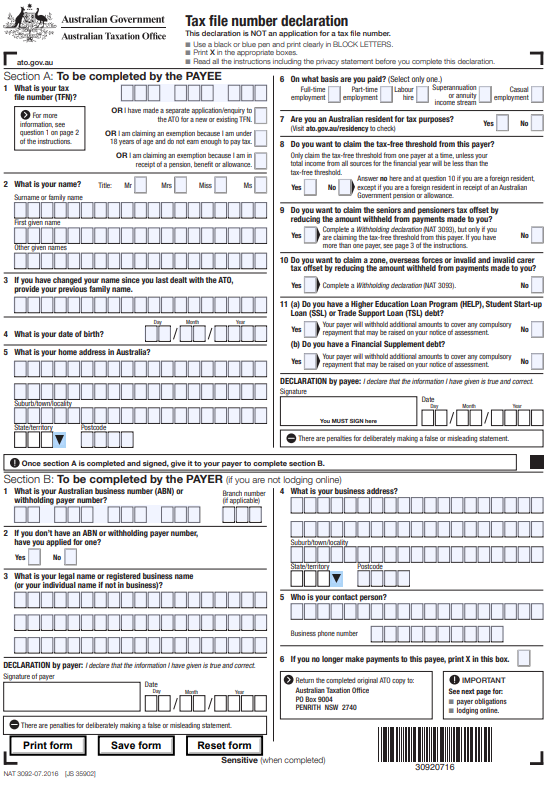
If you’re starting a new job in Australia, you’ll be required to complete the Tax File Number Declaration Form PDF (Editable) to ensure the correct amount of tax is withheld from your salary. This official document is issued by the Australian Taxation Office (ATO) and is commonly referred to as TFN Declaration Form NAT 3092.
In this guide, you’ll learn what the TFN declaration form is, who needs it, how to fill it out, and how to download and edit the PDF version correctly.
What Is the Tax File Number Declaration Form?
The Tax File Number (TFN) Declaration Form is used to:
- Provide your Tax File Number (TFN) to your employer
- Determine how much tax should be withheld from your income
- Claim the tax-free threshold
- Declare your tax residency status
- Notify your employer about education loan debts (HELP, SSL, TSL)
- Claim eligible tax offsets
Important: This is not a TFN application form. If you need to apply for a new TFN, you must do so separately through the ATO.
Download Tax File Number Declaration Form PDF (Editable)
The TFN Declaration Form (NAT 3092) is available in an editable PDF format, which allows you to:
- Fill out details digitally
- Save the form on your device
- Print a completed copy
- Submit it to your employer
Using the editable version reduces errors and makes the process faster compared to handwritten forms.
Who Needs to Complete the TFN Declaration Form?
You must complete this form if you are receiving:
- Full-time employment income
- Part-time wages
- Casual employment payments
- Labour hire income
- Superannuation or annuity income stream
- Director or office holder payments
You should complete it before or when you start working with a new employer.
Each new job requires a separate TFN declaration.
How to Fill the Editable TFN Declaration Form (Section A – Employee)
Below is a simplified breakdown of the key sections:
1. Enter Your TFN
Provide your Tax File Number carefully.
If you:
- Have applied for a TFN → You have 28 days to provide it
- Do not provide your TFN → Tax may be withheld at the highest rate
2. Personal Information
Fill in:
- Full legal name
- Previous name (if applicable)
- Date of birth
- Residential address
Make sure the information matches your official records.
3. Employment Type
Select one:
- Full-time
- Part-time
- Casual
- Superannuation/annuity income stream
- Labour hire
4. Australian Residency Status
Your residency status affects tax rates.
If you are an Australian resident for tax purposes:
- You may claim the tax-free threshold
Foreign residents:
- Are taxed at different rates
- Usually cannot claim the tax-free threshold
5. Claiming the Tax-Free Threshold
The tax-free threshold allows you to earn up to a certain amount before paying income tax.
You should claim it if:
- You are an Australian resident, and
- You are not claiming it from another employer
Only claim it from one employer at a time.
6. Tax Offsets
You may be eligible to claim:
- Seniors and Pensioners Tax Offset (SAPTO)
- Zone Tax Offset
- Overseas Forces Tax Offset
- Invalid or Carer Tax Offset
If claiming offsets, you may need to complete a Withholding Declaration (NAT 3093).
7. Education Loan Debts
Indicate whether you have:
- HELP debt
- Student Start-up Loan (SSL)
- Trade Support Loan (TSL)
- Financial Supplement debt
If yes, your employer will withhold additional amounts for compulsory repayments.
8. Sign and Date
The form must be signed and dated to be valid.
Providing incorrect information may result in penalties.
Section B – To Be Completed by Employer
Your employer must:
- Enter their ABN or withholding payer number
- Provide business details
- Lodge the declaration with the ATO within 14 days
- Withhold tax according to PAYG tax tables
- Store TFN information securely
Employers who fail to comply may face penalties.
Benefits of Using the Editable PDF Version
- Easy to fill digitally
- Reduces handwriting errors
- Faster processing
- Convenient storage
- Printable for record-keeping
Many employers now prefer the editable PDF format for smoother payroll onboarding.
Frequently Asked Questions (FAQs)
Is the TFN Declaration Form mandatory?
It’s not compulsory to provide your TFN, but if you don’t, tax will be withheld at the highest rate.
Can I edit the PDF after saving?
Yes, if you save the editable version before printing.
Do I need a new form for each job?
Yes. A separate TFN declaration must be completed for every new employer.
The Tax File Number Declaration Form PDF (Editable) is an essential document for employees and employers in Australia. Completing it correctly ensures the right amount of tax is withheld and helps avoid unnecessary deductions.
Always download the latest version issued by the Australian Taxation Office to stay compliant with Australian tax regulations.