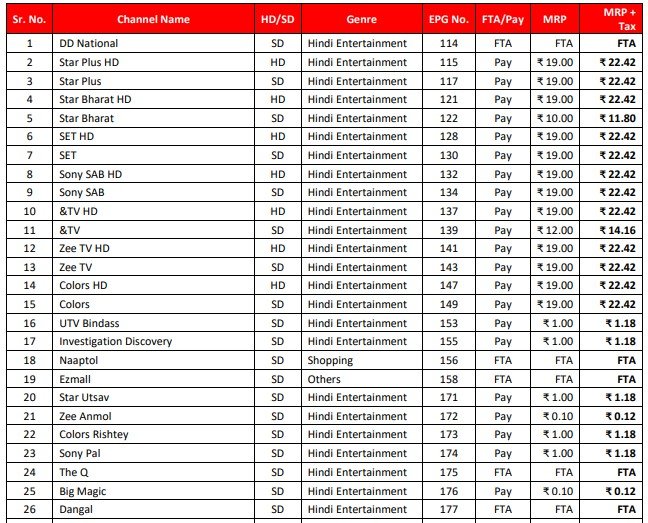
The Tata Sky Channel Number List is a helpful guide for anyone using Tata Sky (now rebranded as Tata Play). Since there are hundreds of channels available—including movies, sports, news, and cartoons—knowing the correct channel number saves you from scrolling endlessly to find what you want to watch.
What Is This List?
This is an official directory that tells you the specific number assigned to every TV channel on the Tata Play platform. It includes the channel name, its number, and whether it is in High Definition (HD) or Standard Definition (SD).
Note: Although the company is now called Tata Play, many people still refer to it as Tata Sky. The service remains the same.
Why Is the List Important?
With so many channels available, it is hard to remember the numbers for all of them. This list helps you:
- Find your favorite channels quickly.
- Help elderly family members use the TV easily.
- Compare channel numbers for HD and normal versions.
- Check which channels are available in your language.
Types of Channels
To make it easier to search, the channels are usually grouped by category:
- Entertainment: Popular channels for daily TV shows and serials.
- Movies: A wide selection of cinema channels in Hindi, English, and regional languages.
- Sports: Channels for live cricket, football, and other international sports.
- News: Channels for breaking news in English, Hindi, and local languages.
- Kids: Cartoons and educational programs for children.
- Music & Devotional: Channels for music videos and religious content.
- Regional: A strong collection of channels for specific languages like Tamil, Telugu, Marathi, Bengali, and many more.
HD vs. SD Channels
Tata Play offers two versions of many channels:
- SD (Standard Definition): The normal version.
- HD (High Definition): The version with better picture and sound quality.
Important: The HD version of a channel usually has a different number than the SD version. For example, Star Plus and Star Plus HD will be on different numbers. You often need a specific HD subscription to view the HD channels.
How to Find Channels on Your TV
You don’t always need the paper list. You can also:
- Press the Guide button on your remote.
- Select the category you want (like Sports or Movies).
- Scroll to find your channel.
Subscription Rules
Even if a channel is on the list, you can only watch it if it is included in the pack you bought. If you try to tune into a channel you haven’t paid for, you will see a message asking you to subscribe.
How to Get the List
You can download the full PDF list from the official Tata Play website. It is a good idea to keep the latest version because channel numbers can change, and new channels are added frequently.