ChatGPT All Shortcut Key List pdf free download: If you use ChatGPT regularly, keyboard shortcuts can save a surprising amount of time. Instead of clicking buttons or navigating menus, you can move faster, write quicker, and manage chats more efficiently. Whether you’re working on Windows 11 or using a Mac, ChatGPT provides a set of simple yet powerful shortcuts.
This guide brings everything together in one place. You’ll get a clean, printable ChatGPT All Shortcut Key List PDF, along with a clear table you can use daily. It’s especially useful for teachers, students, and content creators who rely on speed and workflow.
Why Use ChatGPT Keyboard Shortcuts?
Keyboard shortcuts reduce friction in your workflow. When you remove small repetitive actions, your focus improves. Over time, even basic shortcuts like sending messages or opening new chats can make your work noticeably faster.
For users exploring ChatGPT shortcut Windows 11 or ChatGPT keyboard shortcuts Mac, the core functionality is almost the same. The only difference is the use of Ctrl (Windows) and Cmd (Mac).
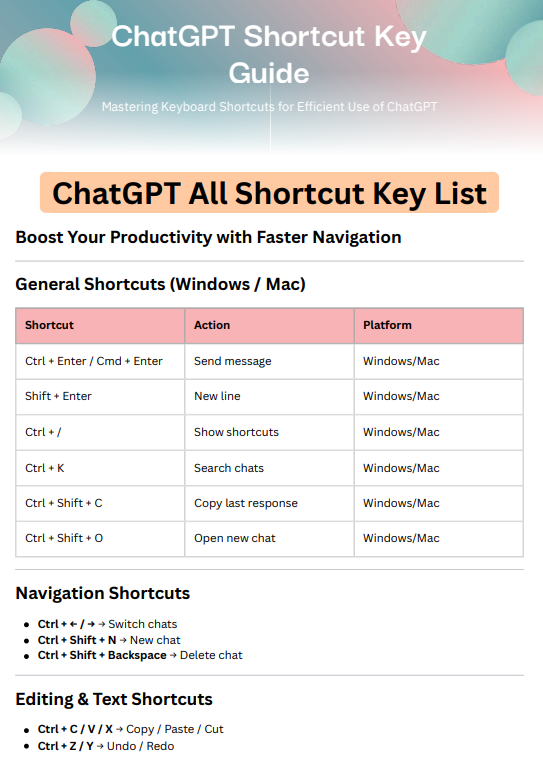
ChatGPT All Shortcut Key List
Below is a practical and updated table of commonly used ChatGPT shortcuts.
| Shortcut (Windows) | Shortcut (Mac) | Action |
|---|---|---|
| Ctrl + Enter | Cmd + Enter | Send message |
| Shift + Enter | Shift + Enter | Add new line |
| Ctrl + / | Cmd + / | Show all shortcuts |
| Ctrl + K | Cmd + K | Search chats |
| Ctrl + Shift + O | Cmd + Shift + O | Open new chat |
| Ctrl + Shift + C | Cmd + Shift + C | Copy last response |
| Ctrl + Shift + N | Cmd + Shift + N | Start new chat |
| Ctrl + Shift + Backspace | Cmd + Shift + Delete | Delete current chat |
| Ctrl + ← / → | Cmd + ← / → | Navigate between chats |
| Ctrl + A | Cmd + A | Select all text |
| Ctrl + C | Cmd + C | Copy text |
| Ctrl + V | Cmd + V | Paste text |
| Ctrl + X | Cmd + X | Cut text |
| Ctrl + Z | Cmd + Z | Undo |
| Ctrl + Y | Cmd + Shift + Z | Redo |
ChatGPT Shortcut Windows 11
On Windows 11, most shortcuts follow standard keyboard patterns using the Ctrl key. These shortcuts integrate smoothly with other apps, so they feel familiar and easy to adopt.
For example, using Ctrl + Enter to send messages or Ctrl + K to search chats aligns with common productivity tools. This consistency helps reduce the learning curve and improves speed quickly.
ChatGPT Keyboard Shortcuts Mac
On Mac devices, shortcuts use the Command (Cmd) key instead of Ctrl. The behavior remains the same, which makes switching between Windows and Mac simple.
Mac users often benefit from smoother navigation using Cmd + arrow keys and quick actions like Cmd + Shift + C to copy responses instantly.
ChatGPT Custom Shortcuts Pro (Advanced Use)
While ChatGPT does not officially provide built-in custom shortcut settings yet, advanced users can still create their own workflows using external tools.
You can use:
- Browser extensions for shortcut mapping
- Automation tools like keyboard remappers
- Productivity apps to assign custom triggers
These approaches allow you to build ChatGPT custom shortcuts Pro setups, such as:
- One key to open ChatGPT instantly
- Custom commands for copying and saving responses
- Automated prompt insertion
This is especially useful for teachers, bloggers, and developers who use ChatGPT frequently.
Mastering ChatGPT shortcuts is not about memorizing everything at once. Start with a few essential keys like sending messages, searching chats, and creating new conversations. As you use them daily, they become natural.
Over time, these small improvements build into a faster, smoother, and more productive workflow.