DS-160 Form pdf information here : DS-160 Form PDF (2026 Guide): Sample, Example & Step-by-Step Process. The DS-160 form is the official online application used by individuals applying for a U.S. nonimmigrant visa. If you plan to visit the United States for tourism, business, study, or temporary work, you must complete the Online Nonimmigrant Visa Application (DS-160) before scheduling your visa interview.
Many people search for a “DS-160 form PDF”, but it is important to understand one key point: the DS-160 is not a downloadable paper form. It must be completed online through the official Consular Electronic Application Center (CEAC). However, you can download sample PDFs and examples that show what the DS-160 application looks like and how each section should be filled.
This guide explains what the DS-160 form is, how to apply, where to download a DS-160 sample PDF, and the exact steps you need to complete the process successfully.
What Is the DS-160 Form?
The DS-160 form is an electronic application required by the U.S. Department of State for individuals seeking a temporary (nonimmigrant) visa. It collects detailed personal, travel, and background information used by U.S. embassies and consulates to process visa applications.
The DS-160 must be completed online, and once submitted you receive a confirmation page with a barcode, which is required for your visa interview.
A DS-160 application typically asks for information such as:
- Personal details and passport information
- Travel plans and U.S. contact details
- Family background
- Employment and education history
- Security and background questions
- Photograph upload
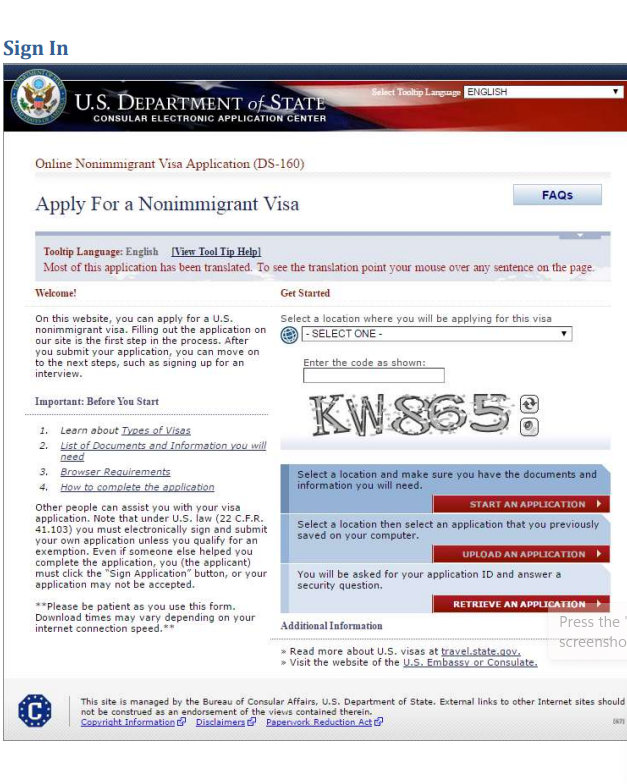
The exemplar document shows how the application screens appear, including sections for personal information, travel information, passport details, family information, employment history, and security questions.
DS-160 Form PDF (Sample & Example)
Although the official application is online, many applicants use DS-160 sample PDFs to understand the structure before filling it out.
A DS-160 example PDF typically includes screenshots of the full application flow, including:
- Sign-in and application retrieval pages
- Personal information sections
- Travel details and companions
- Address and phone information
- Passport details
- Family and employment information
- Security and background checks
- Photo upload and final confirmation page
Reviewing a sample PDF before applying helps applicants prepare accurate information and avoid mistakes during submission.
How to Apply for the DS-160 Form (Step-by-Step)
The DS-160 process is completed entirely online. Follow these steps carefully.
1. Visit the official DS-160 application website
Go to the official Consular Electronic Application Center and start a new application.
2. Select your embassy or consulate
Choose the location where you will attend your visa interview.
3. Create an application ID
The system generates a unique Application ID that allows you to save and return later.
4. Complete all sections of the form
You will fill out multiple sections, including:
- Personal information
- Travel details
- U.S. contact information
- Family background
- Work and education history
- Security questions
5. Upload your visa photograph
The system requires a digital photo that meets U.S. visa photo standards.
6. Review and submit the application
After verifying all information, electronically sign and submit the form.
7. Print the confirmation page
Once submitted, download or print the DS-160 confirmation page with the barcode. This document is required for your visa appointment.
DS-160 Form Sample for B2 Visa
Applicants applying for a B2 tourist visa complete the same DS-160 form but select B2 visa category in the travel information section.
The application will ask for:
- Purpose of travel (tourism, visiting family, medical treatment, etc.)
- Planned travel dates
- U.S. contact or hotel information
- Funding source for the trip
Using a DS-160 form sample for a B2 visa can help applicants understand which answers are required and how to structure travel information correctly.
Key Tips Before Filling the DS-160 Form
Many visa applications are delayed due to simple mistakes. Keep these tips in mind:
Prepare documents first. Have your passport, travel details, and employment history ready before starting the application.
Save your application frequently. The system may expire after inactivity.
Use accurate and consistent information. The data must match your passport and supporting documents.
Write clear answers. Avoid abbreviations unless they are official.
Print the confirmation page. This barcode page is mandatory for the visa interview.
DS-160 Confirmation Page
After submitting the DS-160 form, you will receive a confirmation page with a barcode. This page confirms that your application has been successfully submitted.
You must bring this confirmation page when you:
- Schedule your visa interview
- Attend the embassy appointment
- Submit supporting documents
Without the confirmation page, the embassy cannot access your application.
Frequently Asked Questions (FAQ)
How do I download DS-160 as a PDF?
The DS-160 form itself cannot be downloaded as a blank PDF because it must be completed online. However, after submitting the application, you can print or save the confirmation page as a PDF for your records.
How do I download the DS-160 form?
You cannot download the official form directly. Instead, you must fill it out online through the Consular Electronic Application Center. Sample or example PDFs are available to help you understand the format before applying.
Can I wear jeans to the embassy?
Yes, jeans are generally acceptable for a visa interview. However, applicants are encouraged to dress neatly and professionally to maintain a respectful appearance during the appointment.
Can I refill my DS-160 form?
Yes. If you have not submitted the application yet, you can edit or refill it using your Application ID. If it has already been submitted, you must complete a new DS-160 form and use the new confirmation number.
How long is your DS-160 valid for?
A submitted DS-160 is generally valid for one year from the date of submission, but the confirmation number is usually used only for the visa appointment scheduled shortly after submission.
Can I print my DS-160 form after submitting?
Yes. After submitting the application, you can print the DS-160 confirmation page or save it as a PDF. This page must be presented during your visa interview.